跨組件間傳遞資料
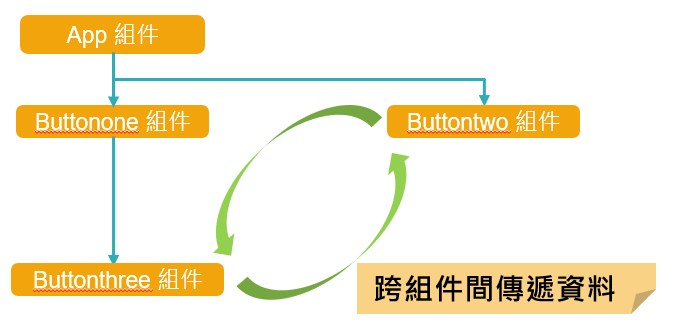
如圖,想讓Buttontwo與Buttonthree間互相傳遞資料, 也就是跨組件傳遞資料。
先說其實useState就能夠做到跨組件傳遞資料,例如 可以先在App組件使用useState,並且透過props將Count與setCount函數傳給子組件, 這樣不論在App的哪一個子組件都能夠使用Count的值, 且能夠使用setCount函數去更新Count的值, 這樣一來一往就實現了跨組件傳遞資料, 但是,中間透過props來傳遞,且途中每一個經過的組件即使沒有要傳遞資料, 卻也都要幫忙傳遞setCount函數,組件一多會非常非常麻煩,所以我們改以使用useContext幫助我們實現。
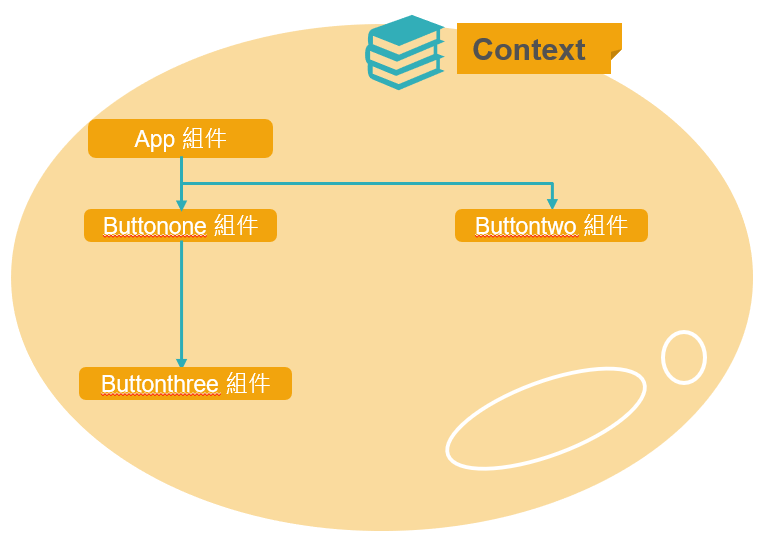
而useContext是為了讓我們方便使用Context的一個Hook, 或許並不是所有人都知道Context是甚麼, 這裡替React的Context做一簡單的介紹, 其實Context就像是泡泡一樣,把所有子組件包住, 並且把資料放到泡泡裡的一個角落, 讓每個在泡泡裡的子組件都能直接拿到Context裡的資料。如下示意圖 :
跨組件傳遞資料實現步驟
它實現主要透過三個步驟,
(1) 先通過createContext創建Context,並賦值給常數Context
(2) 接著使用 <Context.Provider> 標籤包裹子組件,並為標籤內所有子組件提供資料,凡是被這個標籤包住的子組件都可以取用資料
(3) 最後則是在想取用資料的子組件內使用<Context.Consumer>標籤
另外再搭配useState使用,如此一來就實現跨組件傳遞資料了。
通過createContext創建Context
第一步,創建Context,我選擇新增一個檔案store.js,在裡面引入createContext後, 倒出一個常數叫做Context為createContext,其後面括號裡面可以指定預設值,這裡不指定預設值所以寫null,
//store.jsimport React, { createContext } from 'react';//引入createContextexport const Context = createContext(null);//創建Context
使用 Context.Provider 標籤包裹子組件
接著到App組件裡面,將Context先引入, 然後繼續第二步驟,使用 <Context.Provider> 標籤包裹子組件, 並為標籤內所有子組件提供資料,例如令value 為字串"你好嗎?", 現在被這個 <Context.Provider> 標籤包住的子組件Buttonone、Buttontw還有它們各自的子組件都可以取用 Context 資料,
//App.jsimport React, { useState } from 'react';import './App.css'import Buttonone from './Buttonone'import Buttontwo from './Buttontwo';import { Context } from './store'const App = () => {return (<><p >這是我第一個函數組件App</p><Context.Provider value={"你好嗎?"}><Buttonone></Buttonone><Buttontwo></Buttontwo></Context.Provider></>)}export default App;
子組件內使用 Context.Consumer 標籤取用資料
如果我想在Buttonone的子組件Buttonthree裡使用資料, 我就在Buttonthree加上\<Context.Consumer>標籤,且直接使用value, 這樣Context裡的 "你好嗎?"就會被顯示出來了。
注意,標籤裡面使用箭頭函數以剛才在<Context.Provider>裡的value作為參數, 且箭頭函數返回的就是要渲染在畫面上的內容。
// Buttontwo.jsimport React from 'react';import { Context } from './store';const Buttontwo = () => {return (<><Context.Consumer>{value => <p>Buttontwo組件 : {value}</p>}</Context.Consumer></>)}export default Buttontwo;
Context搭配useState
但是現在只實現了取用資料,並還沒有讓子組件們可以更新資料, 那要如何才能讓子組件有辦法更新資料呢? 其實呢,我們只要搭配useState就可以了
import React, { useState } from 'react';import './App.css'import Buttonone from './Buttonone'import Buttontwo from './Buttontwo';import { Context } from './store'const App = () => {const [Count, setCount] = useState(0); //搭配useState,並傳入Context裡return (<><p >這是我第一個函數組件App</p><Context.Provider value={{ Count, setCount }}><Buttonone></Buttonone><Buttontwo></Buttontwo></Context.Provider></>)}export default App;
Context裡現在有了Count與setCount後, 我們就可以在子組件裡讓它觸發setCount函數改變Count的值, 例如在Buttonthree組件裡, 加上一個按鈕,然後讓它的點擊事件觸發setCount,也就是value.setCount,讓它每次點擊按鈕後Count就加1 且也讓Buttontwo組件裡顯示value.Count, 則Buttontwo組件裡顯示的值會隨按按鈕發生改變, 就代表我們實現跨組件傳遞資料了。
//Buttonthree.jsimport React from 'react';import { Context } from './store';const Buttonthree = () => {return (<><Context.Consumer>{value =><><p>Buttonthree組件 : {value.Count}</p><button onClick={() => { value.setCount(value.Count + 1) }}>Buttonthree按鈕</button></>}</Context.Consumer></>)}export default Buttonthree;
//Buttontwo.jsimport React from 'react';import { Context } from './store';const Buttontwo = () => {return (<><Context.Consumer>{value => <p>Buttontwo組件 : {value.Count}</p>}</Context.Consumer></>)}export default Buttontwo;
使用useContext取代 Context.Consumer 標籤
但是大家有沒有發現一件事,就是我們一開始說的useContext一直沒有出現, 所以現在回過頭說一下useContext, useContext其實相當於<Context.Consumer>標籤,只是寫法精簡很多 例如我現在在Buttonthree把<Context.Consumer>標籤改成useContext來寫, 先引入useContext,然後使用useContext,括號裡面放入自store引入的Context, 並且解構賦值出Count與setCount函數,這樣可以直接使用Count與setCount函數了, 如下,整個程式碼都清爽多了,並且結果和使用<Context.Consumer>標籤也是一樣的。
//Buttonthree.jsimport React, { useContext } from 'react';//引入useContextimport { Context } from './store';const Buttonthree = () => {const { Count, setCount } = useContext(Context)//使用useContextreturn (<><p>Buttonthree組件 : {Count}</p><button onClick={() => { setCount(Count + 1) }}>Buttonthree按鈕</button></>)}export default Buttonthree;