useReducer
useReducer簡介
useReducer可以作為useState的另一個選擇, 它與useState相似,一樣能保存狀態, 但更適合處理複雜的狀態邏輯, 或用於處理下一個狀態依賴於上一個狀態時的情況,
// useReducerconst [state, dispatch] = useReducer(reducer, initialState, init);
useReducer有兩個返回值,分別是 State 狀態,與用來更新State的dispatch函數, 更新State時需要使用dispatch函數接受一個名為action的物件, 並且使用dispatch函數時reducer函數也會被調用。
而action物件通常會有一個type屬性,用來描述如何更新State, 另外還能視情況需要多傳入一個payload屬性,裡面可以放一些與更新State相關的值,
//action物件{ type: "如何更新State", payload:{ newstate: "與更新State相關的值"} }
reducer函數接受兩個參數,分別是State與action, State是上一個狀態,action則是使用dispatch函數接受的action物件, 在reducer函數裡,就能透過action物件的type屬性, 做相應處理後,讓其 return 的返回值成為下一個狀態 State。
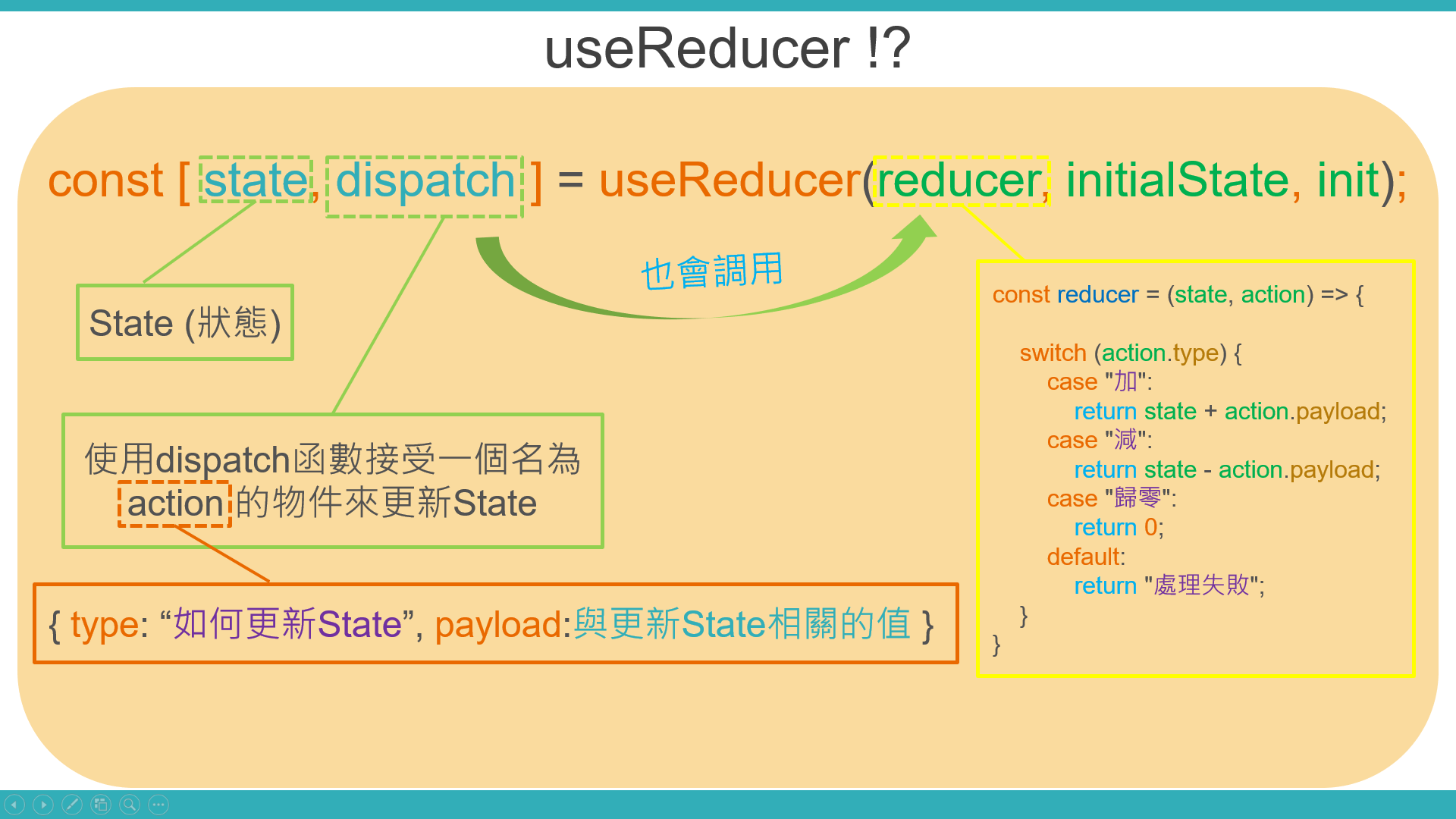
而從reducer函數能夠透過action物件的type屬性對狀態做出不同處置這點來看, 就能看出useReducer比起useState更適合處理複雜的狀態邏輯; 而reducer函數的第一個參數是上一個狀態, 則可以讓我們處理下一個狀態依賴於上一個狀態時的情況。
那useReducer還能接受另外兩個參數, 就是做為狀態初始值的initialState 與init函數,init函數會在useReducer初次執行時調用, 它可以接受initialState作為參數使用, 並且其返回值會覆蓋initialState成為狀態初始值,但是init函數一般比較少用。
使用useReducer
接下來讓我們看看實際例子,如下方程式碼 :
首先初次執行useReducer時會調用這個init函數,它的回傳值會變成狀態初始值, 所以給它加上100後回傳,則現在狀態的初始值就會是100。
再點擊 "+" 這顆按紐,它就會去調用dispatch函數並傳入action物件, 而調用dispatch函數時也會調用reducer函數,並且reducer函數能使用上一個狀態state就是初始值100,與傳進來的action物件, 又type是 "加" ,所以就會把上一個狀態的值 100 加上 action.payload 的值1, 並返回變成下一個狀態state,所以畫面這個state就會變成是101, 依此類推,點擊 C 歸零則會因為返回0所以更新狀態為0。
//Buttontwo.jsimport React, { useReducer } from 'react';//引入useReducerconst init = (initState) => {return initState + 100; // 加上100後回傳,則現在狀態的初始值就會是100}const reducer = (state, action) => {//分別有加、減、歸零三個情況與都不是的情況switch (action.type) {case "加":return state + action.payload;case "減":return state - action.payload;case "歸零":return 0;default:return "處理失敗";}}const Buttontwo = (props) => {const [state, dispatch] = useReducer(reducer, 0, init);//初次執行useReducer時會調用這個init函數return (<><p>Buttontwo組件</p><p>{state}</p><button onClick={() => { dispatch({ type: "加", payload: 1 }) }}>+</button><button onClick={() => { dispatch({ type: "減", payload: 1 }) }}>-</button><button onClick={() => { dispatch({ type: "歸零" }) }}>C</button></>)}export default Buttontwo;
使用useReducer搭配useContext實現複雜的狀態管理
最後,像我們之前說跨組件間傳遞資料時是以useState搭配useContext來實現, 當然也可以使用useReducer搭配useContext來實現更複雜的狀態管理。
使用useReducer搭配useContext方法很簡單, 其實就只是把useState換成useReducer而已。
按Buttonthree組件的按鈕,一樣能夠同步更新Buttonthree組件與Buttontwo組件的值, 那這樣就實現了使用useReducer搭配useContext來管理更複雜的狀態。
//App.jsimport React, { useState, useReducer } from 'react';import Buttonone from './Buttonone'import Buttontwo from './Buttontwo';import { Context } from './store'const reducer = (state, action) => {switch (action.type) {case "加":return state + action.payload;case "減":return state - action.payload;case "歸零":return 0;default:return "處理失敗";}}const App = () => {const [Count, setCount] = useReducer(reducer, 0);//useState換成useReducerreturn (<><p >這是我第一個函數組件App</p><Context.Provider value={{ Count, setCount }}><Buttonone></Buttonone><Buttontwo></Buttontwo></Context.Provider></>)}export default App;
//Buttontwo.jsimport React from 'react';import { Context } from './store';const Buttontwo = () => {return (<><Context.Consumer>{value => <p>Buttontwo組件 : {value.Count}</p>}</Context.Consumer></>)}export default Buttontwo;
//Buttonthree.jsimport React, { useContext } from 'react';import { Context } from './store';const Buttonthree = () => {const { Count, setCount } = useContext(Context)return (<><p>Buttonthree組件 : {Count}</p><button onClick={() => { setCount({ type: "加", payload: 1 }) }}>Buttonthree按鈕</button></>)}export default Buttonthree;