使用事件、更多屬性與傳遞屬性
使用事件
React在使用事件上,例如 onclick、onmouseover、等等,跟在HTML使用十分相似,但有一些語法上的差異, 舉例來說,React事件的名稱是駝峰命名,而在HTML中則都是小寫,且事件的值在JSX中是一個函數,而在HTML則是一個字串,
<button onClick={myClickEvent}>按鈕</button>
React (上) 對比 HTML (下)
<button onclick="myClickEvent()">按鈕</button>
還有在React裡若需要取消預設事件的話,必須要使用preventDefault函數, 不能像HTML一樣直接return false
<a href="#" onClick={(e) =>{e.preventDefault();} }>連結</a>
React (上) 對比 HTML (下)
<a href="#" onclick="return false">連結</a>
更多屬性
其實JSX除了可以使用我們說到的ClassName屬性、style屬性、事件之外,還支援更多其它屬性,這裡整理部分屬性列於下 更多屬性可參考至 : https://zh-hant.reactjs.org/docs/dom-elements.html
React 中可以使用這些 DOM attribute:
accept acceptCharset accessKey action allowFullScreen alt async autoCompleteautoFocus autoPlay capture cellPadding cellSpacing challenge charSet checkedcite classID className colSpan cols content contentEditable contextMenu controlscontrolsList coords crossOrigin data dateTime default defer dir disableddownload draggable encType form formAction formEncType formMethod formNoValidateformTarget frameBorder headers height hidden high href hrefLang htmlForhttpEquiv icon id inputMode integrity is keyParams keyType kind label lang listloop low manifest marginHeight marginWidth max maxLength media mediaGroup methodmin minLength multiple muted name noValidate nonce open optimum patternplaceholder poster preload profile radioGroup readOnly rel required reversedrole rowSpan rows sandbox scope scoped scrolling seamless selected shape sizesizes span spellCheck src srcDoc srcLang srcSet start step style summarytabIndex target title type useMap value width wmode wrap
同樣地,所有 SVG attribute 都可以使用:
accentHeight accumulate additive alignmentBaseline allowReorder alphabeticamplitude arabicForm ascent attributeName attributeType autoReverse azimuthbaseFrequency baseProfile baselineShift bbox begin bias by calcMode capHeightclip clipPath clipPathUnits clipRule colorInterpolationcolorInterpolationFilters colorProfile colorRendering contentScriptTypecontentStyleType cursor cx cy d decelerate descent diffuseConstant directiondisplay divisor dominantBaseline dur dx dy edgeMode elevation enableBackgroundend exponent externalResourcesRequired fill fillOpacity fillRule filterfilterRes filterUnits floodColor floodOpacity focusable fontFamily fontSizefontSizeAdjust fontStretch fontStyle fontVariant fontWeight format from fx fyg1 g2 glyphName glyphOrientationHorizontal glyphOrientationVertical glyphRefgradientTransform gradientUnits hanging horizAdvX horizOriginX ideographicimageRendering in in2 intercept k k1 k2 k3 k4 kernelMatrix kernelUnitLengthkerning keyPoints keySplines keyTimes lengthAdjust letterSpacing lightingColorlimitingConeAngle local markerEnd markerHeight markerMid markerStartmarkerUnits markerWidth mask maskContentUnits maskUnits mathematical modenumOctaves offset opacity operator order orient orientation origin overflowoverlinePosition overlineThickness paintOrder panose1 pathLengthpatternContentUnits patternTransform patternUnits pointerEvents pointspointsAtX pointsAtY pointsAtZ preserveAlpha preserveAspectRatio primitiveUnitsr radius refX refY renderingIntent repeatCount repeatDur requiredExtensionsrequiredFeatures restart result rotate rx ry scale seed shapeRendering slopespacing specularConstant specularExponent speed spreadMethod startOffsetstdDeviation stemh stemv stitchTiles stopColor stopOpacitystrikethroughPosition strikethroughThickness string stroke strokeDasharraystrokeDashoffset strokeLinecap strokeLinejoin strokeMiterlimit strokeOpacitystrokeWidth surfaceScale systemLanguage tableValues targetX targetY textAnchortextDecoration textLength textRendering to transform u1 u2 underlinePositionunderlineThickness unicode unicodeBidi unicodeRange unitsPerEm vAlphabeticvHanging vIdeographic vMathematical values vectorEffect version vertAdvYvertOriginX vertOriginY viewBox viewTarget visibility widths wordSpacingwritingMode x x1 x2 xChannelSelector xHeight xlinkActuate xlinkArcrolexlinkHref xlinkRole xlinkShow xlinkTitle xlinkType xmlns xmlnsXlink xmlBasexmlLang xmlSpace y y1 y2 yChannelSelector z zoomAndPan
傳遞屬性
我們也可以使用自訂的屬性,只要它們是完全小寫的。知道了這件事 我們來說明如何使用自訂屬性來傳遞屬性,
假設有兩個組件,一個為App組件、一個為Buttonone組件, 在App組件引入Buttonone組件後,在Buttonone標籤上面寫一個自訂屬性,通常會叫做props令其等於物件a為1, 這樣就代表我們要將props屬性傳入buttonone組件裡,並且我們可以在buttonone組件裡取用這個屬性傳入的物件
import React from 'react';import Buttonone from './Buttonone'const App = () => {return (<><Buttonone props={{ a: 1 }}></Buttonone></>)}export default App;
當然我也傳入多個自訂屬性像這樣子,傳入props、p1、p2三個自訂屬性
import React from 'react';import Buttonone from './Buttonone'const App = () => {return (<><Buttonone props={{ a: 1 }} p1={{ b: 2 }} p2={{ c: 3 }}></Buttonone></>)}export default App;
傳入物件可以這樣使用,先至buttonone組件裡,讓他接受參數,名字方便大家區分我就叫做p吧, 先把它輸出看看,它輸出了一個物件,裡面包著我們剛剛宣告的物件props、p1與p2。
import React from 'react';const Buttonone = (p) => {console.log(p);//輸出傳入物件return (<button>按鈕</button>)}export default Buttonone;//輸出 : { props: { a: 1 }, p1={ b: 2 }, p2={ c: 3 } }
接著可以把這個物件做一下解構賦值,如圖片這樣,把剛才輸出的物件解構到props跟other裡
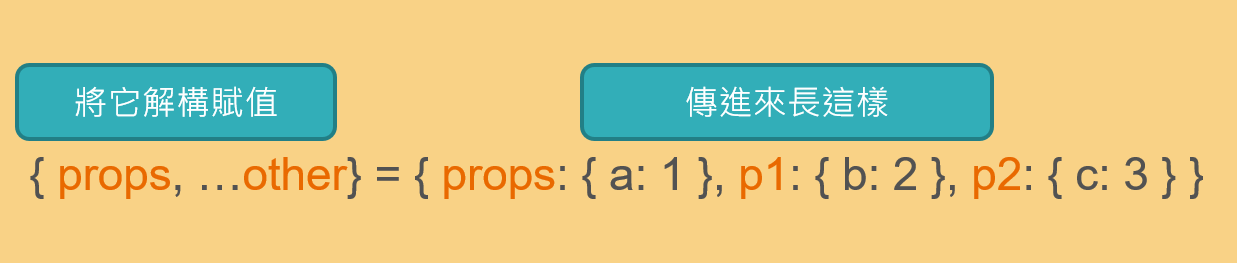
改一下接收的參數p,改成 { props, ...other } ,其中將props屬性解構成props,其他屬性用拓展符放到物件other裡, 再輸出一下props跟other, 你會發現prop就是物件a為1,而other是一個物件包著p1、P2, 這樣一來就很方便我們使用App組件傳遞過來的屬性了,例如,可以使用如 {props.a}、{other.p1.b},
import React from 'react';const Buttonone = ({ props, ...other }) => {console.log(props);console.log(other);return (<button>按鈕 {props.a} {other.p1.b}</button>)}export default Buttonone;