Fetch 發送請求(request)
基本介紹
Fetch API提供了一個能獲取包含跨網路資料的資料介面。它有點像我們所熟悉的 XMLHttpRequest 又或者像 ajax,但這個新的 API 提供了更強更彈性的功能。 此外,因為React以前後端分離的方式開發,前端需要發起請求並從後端(Server)傳送資料回前端,再由瀏覽器更新渲染資料至畫面,所以每當需要自後端(Server)更新資料時,都可能會使用 Fetch。
而fetch() 函數裡第一個參數,就是要取得資料的網址。該方法會回傳一個 resolve 的 promise 回應。你也能選擇性地使用第二個物件參數來設置 request 參數。
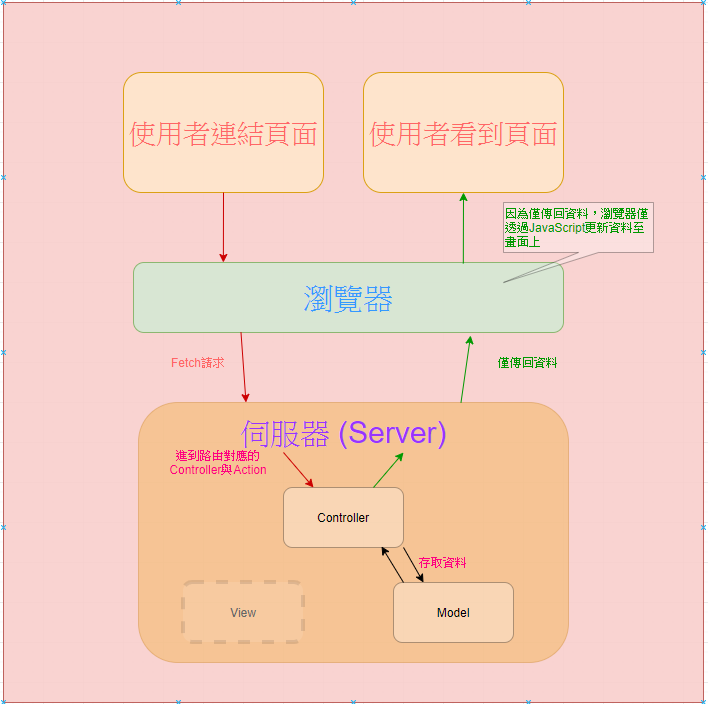
Fetch請求範例
以下將以開源的API "https://jsonplaceholder.typicode.com/" 作為Fetch請求的網址
Get 請求
以下透過Get方法發送請求 :
fetch('https://my-json-server.typicode.com/taiwanhua/demo/posts',{ methods: 'GET' }).then(response => response.json()).then(json => console.log(json)) //返回 (3) [{…}, {…}, {…}]0: {id: 1, title: "Post 1"}1: {id: 2, title: "Post 2"}2: {id: 3, title: "Post 3"}
POST 請求
以下透過POST方法發送請求 :
fetch('https://my-json-server.typicode.com/taiwanhua/demo/posts', {method: 'POST',body: JSON.stringify({title: '新增標題',body: '新增內文',userId: 1}),headers: {"Content-type": "application/json; charset=UTF-8"}}).then(response => response.json()).then(json => console.log(json)) // 返回 {title: "新增標題", body: "新增內文", userId: 1, id: 4}